


Skip to the main content.

EVENT PLANNING

Event text messaging that keeps attendees informed and staff coordinated

Whether you're running a conference, a fundraiser, or a company-wide meeting, Text-Em-All makes it easy to reach everyone at once. From save-the-dates to day-of updates to post-event follow-ups, no phone tag required.

Get your free account

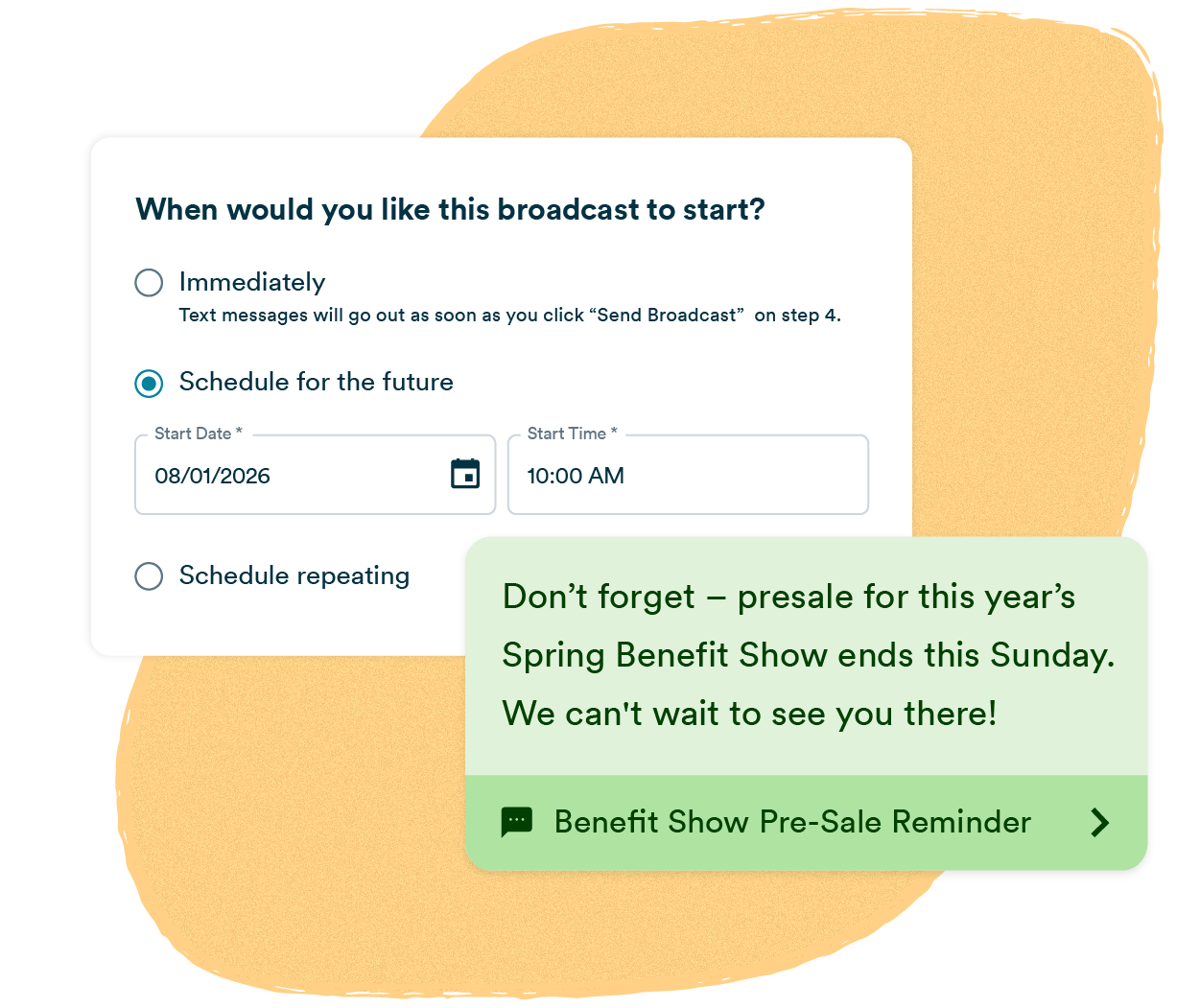
A mass texting platform broadcast scheduling interface with “Schedule for the future” selected, alongside a Benefit Show Event Reminder message notifying contacts that presale for tickets for the Benefit Show ends soon.
logo-ups chewy-logo-lg aldi-logo (1)-1-1 logo-express-lg-1 FCAuto Pepsi Ikea Delta

What is event text messaging?

Event text messaging is a mass communication method that lets organizers send instant updates to attendees, staff, and volunteers from a single platform. It covers the full event lifecycle: reminders before, real-time updates during, and follow-ups after. Messages reach thousands of people in seconds on the device they already have in their pocket.

Why organizations trust Text-Em-All for text reminders

Delivered in seconds

Send to your entire attendee list, staff roster, or volunteer group in one broadcast. Text-Em-All automatically filters out non-textable numbers so your message reaches everyone it can, without any manual cleanup on your end.

98% open rate

Texts get read. The average SMS open rate is 98%, compared to around 20% for email. For time-sensitive information like schedule changes, parking updates, or emergency alerts, that difference matters.

Consent-first by design

Text-Em-All is built for responsible communication. The platform makes it easy to manage opt-outs, segment your lists, and stay compliant with TCPA requirements. How you collect consent is up to you. We make sure honoring it is never an afterthought.

Who uses Text-Em-All for event communication?

Text-Em-All serves event organizers across industries, from conference planners managing thousands of attendees to nonprofit coordinators keeping volunteers on the same page. Any organization that needs reliable, fast communication before, during, or after an event can use the platform to send updates at scale without a learning curve.

Conference and event planners

Send registration confirmations, session reminders, and day-of alerts to hundreds or thousands of attendees from one platform, without chasing down a phone tree.


Nonprofits and fundraisers

Keep volunteers briefed, remind donors about upcoming events, and push real-time updates when plans change. No app download required for recipients.

Corporate teams

Send internal event reminders, share logistics, and follow up with post-event surveys. No more guessing whether anyone saw the email.


Schools and universities

Reach students, parents, and staff in seconds for parent nights, graduations, and campus-wide announcements. No app to download, no login required.

Key features for event text messaging

Text-Em-All gives event organizers the tools to communicate before, during, and after an event without juggling multiple platforms. From scheduled reminders to two-way conversations to delivery analytics, every feature is built to make large-scale event communication faster and more reliable.

icon-auto reply 1

Scheduled sending

Build your entire communication sequence in advance. Set up a save-the-date, a one-week reminder, and a day-of alert all at once, then let them send automatically while you focus on running the event.

icon-convo

Two-way texting

Attendees can reply directly to your broadcast. Answer questions, confirm registrations, and handle last-minute changes without switching to a separate inbox or asking staff to monitor a phone.

icon-MMS 1

Rich media (MMS)

Send images, maps, QR codes, and event graphics alongside your message. Give attendees everything they need to find the venue, check in, or access their ticket in one text.

icon-contact 1

Contact management

Organize attendees, staff, and volunteers into separate groups and message each one with the information that's relevant to them. No more sending venue parking details to your volunteer coordinators.

icon-reporting

Detailed analytics

See exactly who received your message, who replied, and who opted out. Transparent delivery reporting means you never have to wonder whether your attendees got the update.

icon-auto reply 1

Automation

Set up keyword-triggered responses so attendees get instant answers without anyone on your team lifting a finger. Text CONFIRM to lock in attendance. Text DIRECTIONS for the venue address. It runs itself.

Best practices for event text messaging

Effective event text messaging comes down to timing, clarity, and segmentation. Send too early and attendees forget. Send too late and they can't act. Keep messages short, identify your organization in the first line, and make sure each message has one clear purpose.

01
Identify yourself

Open every message with your organization or event name. Recipients need to know immediately who is texting them before they'll read the rest.

02
One action for each message

Ask the recipient to do one thing: confirm attendance, save the date, or check in on arrival. Multiple asks get partial responses at best.

03
Keep it consistent

Build a sequence and stick to it. A save-the-date four weeks out, a reminder one week before, and a day-of logistics update. Attendees who know what to expect show up prepared.

How to send an event text message

Sending an event text with Text-Em-All takes minutes. Import your contact list, write your message, choose when to send it, and track delivery in real time. No training required, no technical setup, and no app for recipients to download.

01
Add contacts

Upload your attendee list, staff roster, or volunteer group as a CSV, or add contacts manually. Text-Em-All automatically filters out non-textable numbers before your message goes out.

02
Send your message

Choose text, voice, or a combination. Write your message, add images or event details, and schedule it for now or later. Set up your full sending sequence in one sitting.

03
Engage with replies

Respond to attendee questions directly from your inbox, or set up auto replies to handle common requests like directions or parking info automatically.

04
Track performance

See who received your message, who replied, and who opted out. Confirm your attendees got the information they need before the event starts.

Questions about texting for events

Your attendees deserve to get the message

Sign up for a free account and send your first event text in minutes. No credit card required.