



APPOINTMENT & PAYMENT REMINDERS
Cut no-shows and late payments with text message reminders
Text-Em-All sends appointment and payment reminders directly to your contacts' phones, which is the one place they always check. Schedule reminders in advance, automatically collect confirmations, and stop chasing people who forgot.
No credit card required.
What are text message reminders?
Text message reminders are automated SMS messages sent to contacts before an appointment, payment due date, or deadline. They reduce no-shows, speed up collections, and eliminate the manual follow-up work that consumes staff time. Organizations send them 24–48 hours in advance, often paired with a second reminder the day of, to confirm attendance or trigger payment before the window closes.
Why organizations trust Text-Em-All for text reminders
Read within minutes
98% of text messages are opened within three minutes. No inbox scanning, no voicemail to check. The reminder lands when it needs to.
Confirmations come back automatically
Contacts reply with a keyword, and their response is logged instantly. Your dashboard shows who confirmed and who still needs follow-up.
Set it once, run it on repeat
Schedule reminders days or weeks out, and build recurring sequences. The system runs on its own once it's set up.
Who uses Text-Em-All for reminders?
From solo practitioners to large health systems, any organization dealing with scheduled appointments or recurring payments relies on text reminders to keep things moving.
Healthcare and clinics
Reduce patient no-shows, send pre-visit prep instructions, and collect intake forms before the appointment window opens. Practices using automated reminders report no-show reductions of 30–40%.
Property management and leasing
Send rent due reminders before the due date, follow up on late balances, and notify tenants about maintenance visits — without playing phone tag.
Home services and contractors
Confirm service appointments the morning of, collect payment after the job, and send follow-up review requests — all from the same platform.
Financial services and nonprofits
Remind clients about loan payment due dates, upcoming consultations, and annual reviews. Nonprofits use payment reminders to follow up on pledge commitments without a hard sell.
Key features for text message reminders
Scheduled sending
Queue reminders days or weeks out so they deliver at exactly the right time, even if you're not at your desk.
Two-way texting
Contacts reply to confirm, cancel, or reschedule, and you see every response in one organized inbox.
Rich media (MMS)
Attach maps, forms, payment links, or prep instructions directly in the reminder so contacts have everything they need before they arrive.
Personalization
Merge in first name, appointment time, provider name, or any field from your contact list so every message feels 1:1.
Detailed analytics
See exactly who received, opened, and replied — and which reminders are working so you can refine your sequence over time.
Integrations and API
Connect Text-Em-All to your scheduling software, CRM, or EHR, so reminder lists sync automatically without manual exports.

Best practices for text announcements
Effective text reminders do two things: give contacts enough time to act, and make the action obvious. Send 48 hours out, include a one-tap reply, and identify your organization in the first line. Those three habits separate reminders that get responses from ones that get ignored.
01
Send at the right time
The highest-performing sequences combine a 48-hour reminder with a shorter confirmation the morning of. The first gives people time to reschedule. The second locks in attendance.
02
State the action clearly
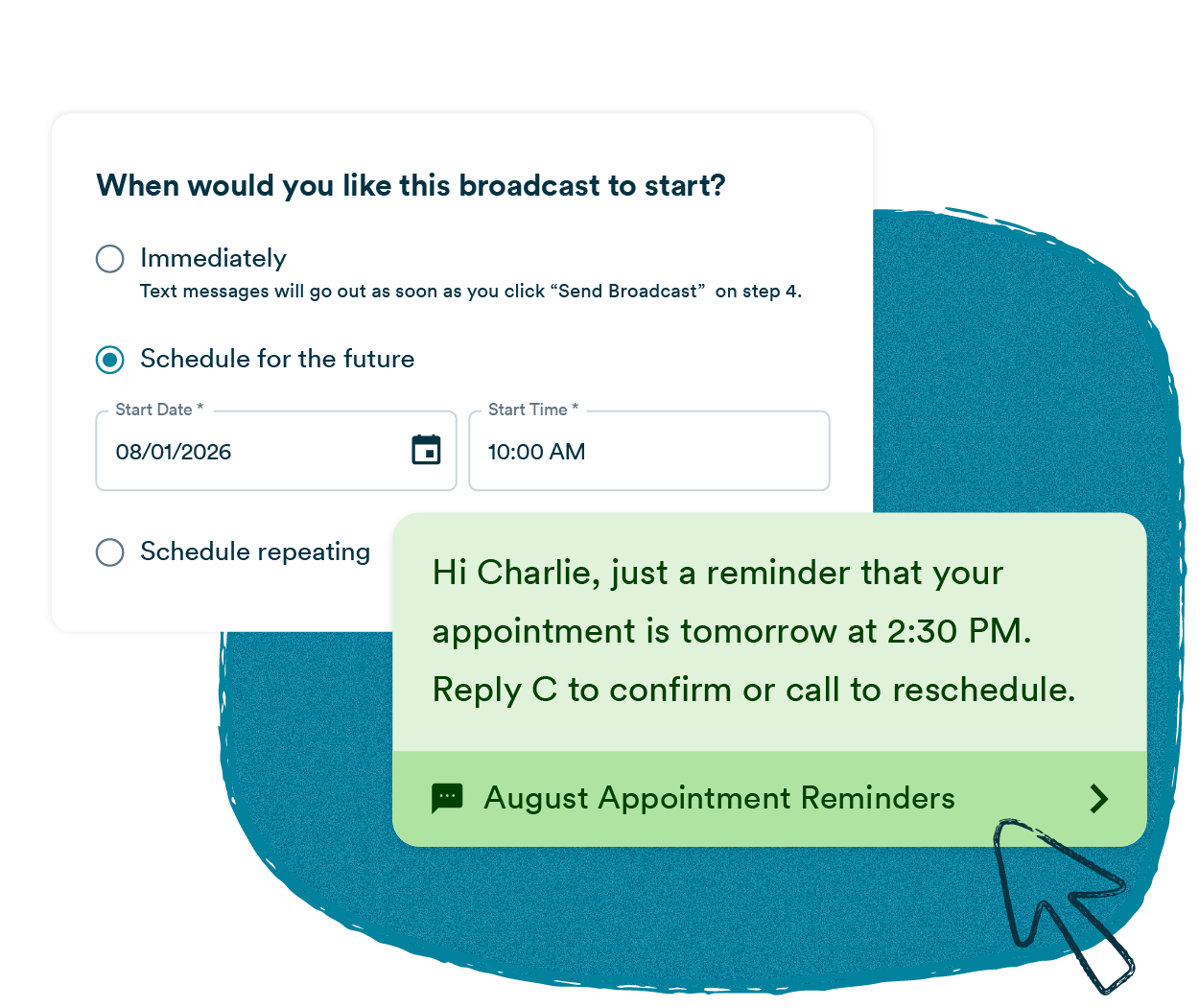
If you want a confirmation, say exactly what to type. "Reply C to confirm or RESCHEDULE to pick a new time" gets a higher response rate than "let us know if you have any questions." One action per message, stated plainly.
03
Identify yourself first
Recipients need to know who is texting them. "Grove Medical: Your appointment with Dr. Chen is tomorrow at 2 PM" lands differently than a message that starts with the appointment detail. Identify yourself in the first line, every time.
How to send appointment reminders with Text-Em-All
Sending appointment reminders with Text-Em-All takes four steps: import your contacts, write your message with merge tags for personalization, schedule the send time, and track confirmations as replies come in. Most organizations have their first reminder sequence running within a few days of signing up.
01
Add contacts
Upload a spreadsheet or add contacts manually. Include name, appointment time, and any custom fields. Text-Em-All automatically filters out non-textable numbers before you send.
02
Write your reminder
Write and personalize your message. If needed, attach a form, map, or payment link. Set keyword replies such as CONFIRM or CANCEL to automatically route responses.
03
Schedule it
Queue your first message 48 hours out, then a follow-up the morning of. We suggest TCPA sending windows, so messages should only be delivered between 8 AM and 9 PM in the recipient's time zone.
04
Analyze and respond
See confirmed, cancelled, and non-responsive contacts in one dashboard. Send a targeted follow-up to anyone who hasn't replied. Export the delivery report for billing or team records.
An easy & reliable way to send text blast reminders to a large group. We used it to send an event reminder to almost 300 people. We imported the numbers and set up a timed message to go out 5 hours before the event. Turned a large task into a breeze with one click.
- Lisa, AllStaff
Questions about text message reminders
-
How effective are text message reminders at reducing no-shows?
Text reminders consistently outperform phone calls and email for no-show reduction because they arrive on the device people check most and require almost no effort to act on. Healthcare practices using automated reminders often reduce no-show rates by around 30–40%, with some studies showing even greater improvements. The format matters too: reminders that include a one-tap reply for confirmation outperform passive reminders that just state the appointment time.
-
What types of reminders can I send with Text-Em-All?
Text-Em-All supports appointment reminders, payment due reminders, event reminders, deadline alerts, service visit notifications, membership renewals, medication adherence reminders, and post-visit follow-ups. Each message can include personalized fields, attachments like forms or payment links, and keyword reply options for confirmations or rescheduling.
-
How far in advance should I send an appointment reminder?
The highest-performing sequences use two reminders: one 48 hours before the appointment and a second the morning of. The 48-hour reminder gives contacts enough time to reschedule if needed. The day-of reminder locks in attendance and can include any last-minute details like parking instructions or what to bring. Single reminders sent only 24 hours out tend to catch people who can no longer reschedule easily, which increases cancellations without reducing no-shows.
-
Can contacts confirm or reschedule by replying to the text?
Yes. Text-Em-All's two-way texting and survey features let you set up keyword-based replies. When a contact texts back CONFIRM, CANCEL, or RESCHEDULE, the platform logs the response automatically and can trigger a follow-up message. You see every reply in a shared inbox, so your team can follow up manually with anyone who needs more help without losing track of the thread.
-
Do I need to register my number before sending reminders?
Yes. Any business sending text messages at volume through 10-digit numbers (10DLC) is required to register through The Campaign Registry. Text-Em-All handles this registration process for you at no additional charge, and most registrations are processed within one to two business days. Unregistered traffic gets filtered by carriers, so registration protects your deliverability. We walk you through every step.
-
Are text reminders compliant with TCPA and healthcare privacy requirements?
Text-Em-All is built with compliance as a baseline. The platform includes opt-out management and consent tracking tools that support TCPA requirements. For healthcare organizations, appointment reminders sent to existing patients generally fall under informational consent rather than promotional consent — but your compliance team should confirm based on your specific use case. We're not attorneys and don't provide legal advice, but we can connect you with resources to help you get it right.
-
How much does it cost to send text message reminders?
Text-Em-All offers pay-as-you-go pricing using credits (charged per 160-character segment) and monthly plans for organizations with consistent sending volume. There are no long-term contracts on any plan. Visit our pricing page for current rates, or use the SMS cost calculator to estimate what a reminder sequence would cost based on your contact list size.
Your contacts deserve to know before it's too late to reschedule
Text-Em-All makes it easy to send reminders that actually reach people, collect confirmations without manual follow-up, and keep your schedule and your cash flow on track.