

Text message delivery: A journey with many steps
Understanding the journey of a text message can help you appreciate the various steps and players involved in delivering your messages. While the process might seem complex, we'll break it down into simple, easy-to-understand steps.
Why are my text messages not being delivered?
Text messages fail to deliver when a carrier blocks or filters them, and it usually comes down to four things. The carrier registration for your number is missing or stuck. A carrier's filter flagged the message. The people you texted never opted in. Or your list is old, with numbers that no longer work. Check registration first, then your opt-in records, then the message itself.
How a text message gets from you to the phone
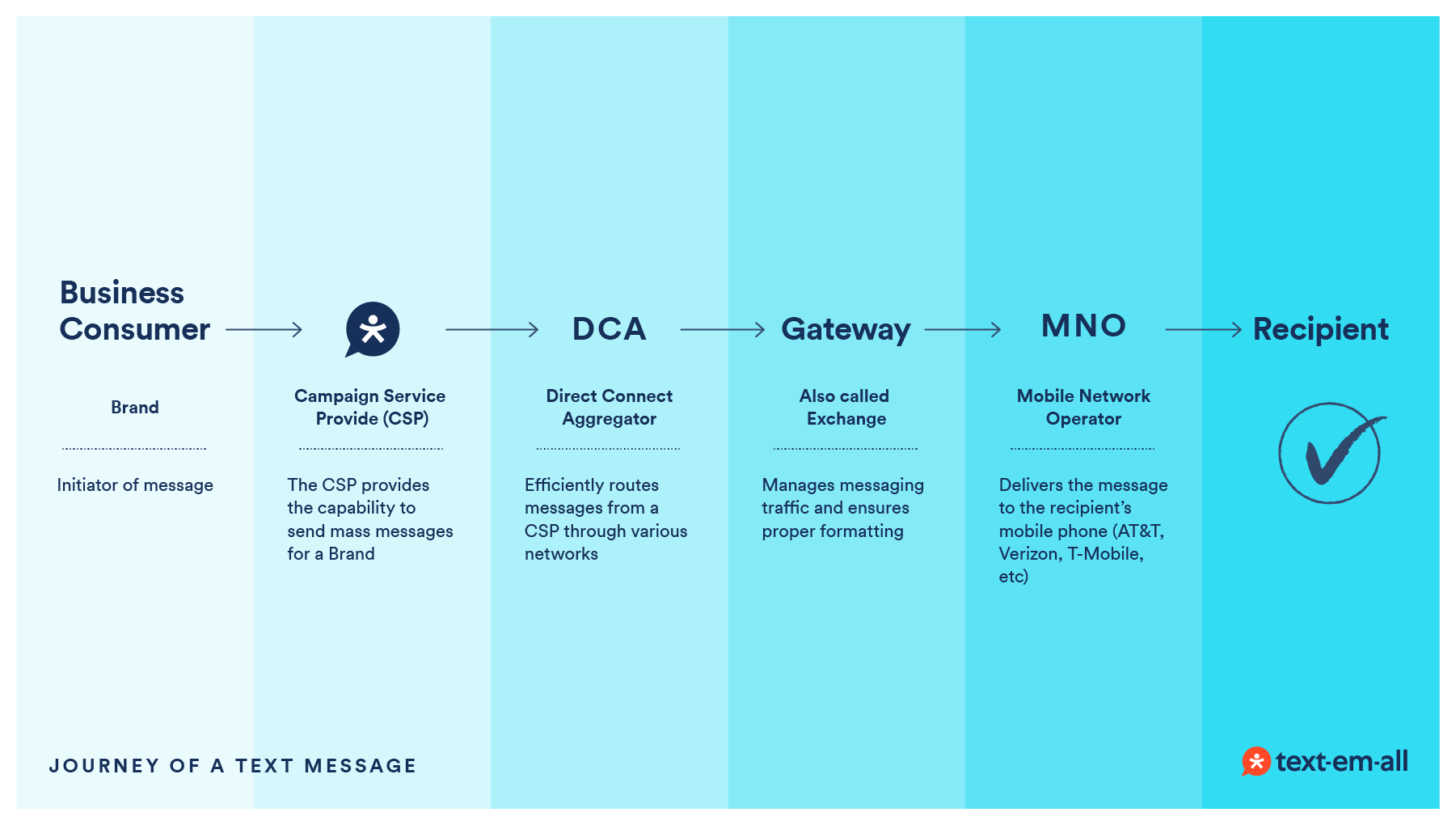
- From the brand to Text-Em-All (campaign service provider)
Brand (business customer): You, the business customer, create and send a text message using Text-Em-All’s platform. This message could be an emergency notification, a reminder, or a job shift fill, among other types. Campaign service provider (CSP): Text-Em-All acts as your CSP. We take your message, ensure it complies with regulations, and prepare it for delivery. Our role is to provide the interface and features needed to make the process work while helping you stay compliant so you can focus on your communication needs.
- From Text-Em-All to a direct connect aggregator (DCA)
Direct connect aggregator (DCA): Once your message is ready, Text-Em-All sends it to a DCA like Twilio, Bandwidth, or Sinch. DCAs are responsible for routing your message through the most efficient and reliable paths. Aggregators also set rules to ensure content and message delivery comply with MNO requirements. The DCA may reject messages and/or block text numbers that don’t comply. They handle the heavy lifting of connecting your message to the right mobile networks.
- From the DCA to a gateway (or exchange)
Gateway (or exchange): Some DCAs directly connect to the MNOs, others might need to pass your message to a Gateway like Syniverse. Gateways act as hubs that manage the traffic of numerous messages, ensuring they’re correctly formatted and ready for the final step. These Gateways also help the various MNOs connect to message recipients who aren’t on their networks. They play a crucial role in managing message flow and preventing bottlenecks.
- From the gateway to the mobile network operator (MNO)
Mobile network operator (MNO): Finally, the message reaches an MNO like AT&T, Verizon, or T-Mobile. MNOs are the carriers that deliver the message to the recipient’s mobile phone. These carriers determine the rules that every downstream must comply with to deliver messages to their platform. For example, T-Mobile has rules that are different from AT&T regarding delivery speeds, daily volumes, and message filtering. They ensure the message is delivered promptly and accurately to the intended recipient.
- To the message recipient
Message recipient: The recipient receives the text message on their mobile phone. Depending on the nature of your message, this could be an employee, a customer, or a community member.
The value of each player
| Player | What it does |
|---|---|
| Brand | The initiator of the message, focusing on reaching their message recipients. |
| Campaign service provider (CSP) | Provides the capability to send mass messages for a Brand. |
| Direct connect aggregator (DCA) | Routes messages from a CSP efficiently through various networks. |
| Gateway (or exchange) | Manages message traffic and ensures proper formatting. |
| Mobile network operator (MNO) | Delivers the message to the recipient's mobile phone. |
Key takeaways
- The journey of a text message involves multiple steps and key players.
- Each player has a specific role to ensure the message is delivered efficiently and compliantly.
- Understanding this process helps you appreciate each player's contribution to delivering your messages and understand why bottlenecks can occur.
Your text message delivery questions
Why are my text messages not being delivered?
Your text messages aren't being delivered because a carrier is blocking or filtering them. It usually comes down to four things: your carrier registration, also called 10DLC registration, is missing or stuck; a filter flagged the message; the people you texted never opted in; or your list is out of date. Check registration first. The carriers approve most registrations in 1 to 2 business days, so if you're planning to send around a certain date, start early.
What is carrier filtering?
Carrier filtering is how the carriers screen text messages for spam before they reach a phone. Each carrier sets its own rules for message content, daily volume and delivery speed, and the rules differ: T-Mobile's aren't AT&T's. A message that breaks a rule can be held back or blocked even when your account is fine. Sending from a registered number, to people who opted in, in plain and varied wording, keeps you inside them.
Why are carriers blocking my text messages?
Carriers block text messages when the sender or the message breaks their rules, and the block can happen at two points. The aggregator that routes your message can reject it or block a number that doesn't comply, and the carrier can filter what gets through. The usual triggers are an unregistered number, content that looks like spam, and recipients who never agreed to hear from you. Text-Em-All marks a message that didn't go through as Failed in your account.
How does message delivery work?
Message delivery is a five-step trip. You write the message in Text-Em-All, which acts as your campaign service provider and helps you stay compliant, and we pass it to an aggregator such as Twilio, Bandwidth or Sinch to route it. Some aggregators send it through a gateway such as Syniverse first, and a carrier such as AT&T, Verizon or T-Mobile then delivers it to the phone. A block can happen at any handoff, so one message can fail while another goes through.
Why are my business text messages being filtered as spam by carriers?
Carriers filter business text messages as spam when a message looks like the spam they're built to stop. Bulk sends of identical wording, phrases like "act now" or "free prize," all caps, extra punctuation, email addresses and links, and heavy repetition all raise flags. Vary your wording, write in a plain and natural tone, and use a full link that leads to a real destination instead of a shortened one.
Why are my business SMS messages being blocked by carriers?
Carriers block business SMS messages when the sender isn't registered, when the content breaks their rules, or when people report the messages as unwanted. If yours are being blocked, check your delivery report first, then contact support, and we'll ask the carrier for the reason. If registration is the cause, one of our compliance representatives will walk you through the fix. Then review your opt-ins and your wording before you send again.
Still not getting through? Read the help article on why text messages aren't delivered.


