


What is a text survey?
A text survey is a mass SMS message that prompts recipients to respond with a short answer, keyword, or rating. Organizations use them to collect feedback, confirm attendance, fill open shifts, and reduce no-shows. Because texts are read within minutes of delivery, response windows are short and data comes back fast.
Why organizations trust Text-Em-All for text surveys
Responses come back fast
Most contacts read and reply to texts within minutes of delivery. When you need answers from hundreds of people, text gets you data the same day — not the same week.
Two-way conversations included
Every survey broadcast comes with two-way texting built in. If a contact replies with a question or a flag, you can respond directly without switching tools or losing the thread.
Results you can act on
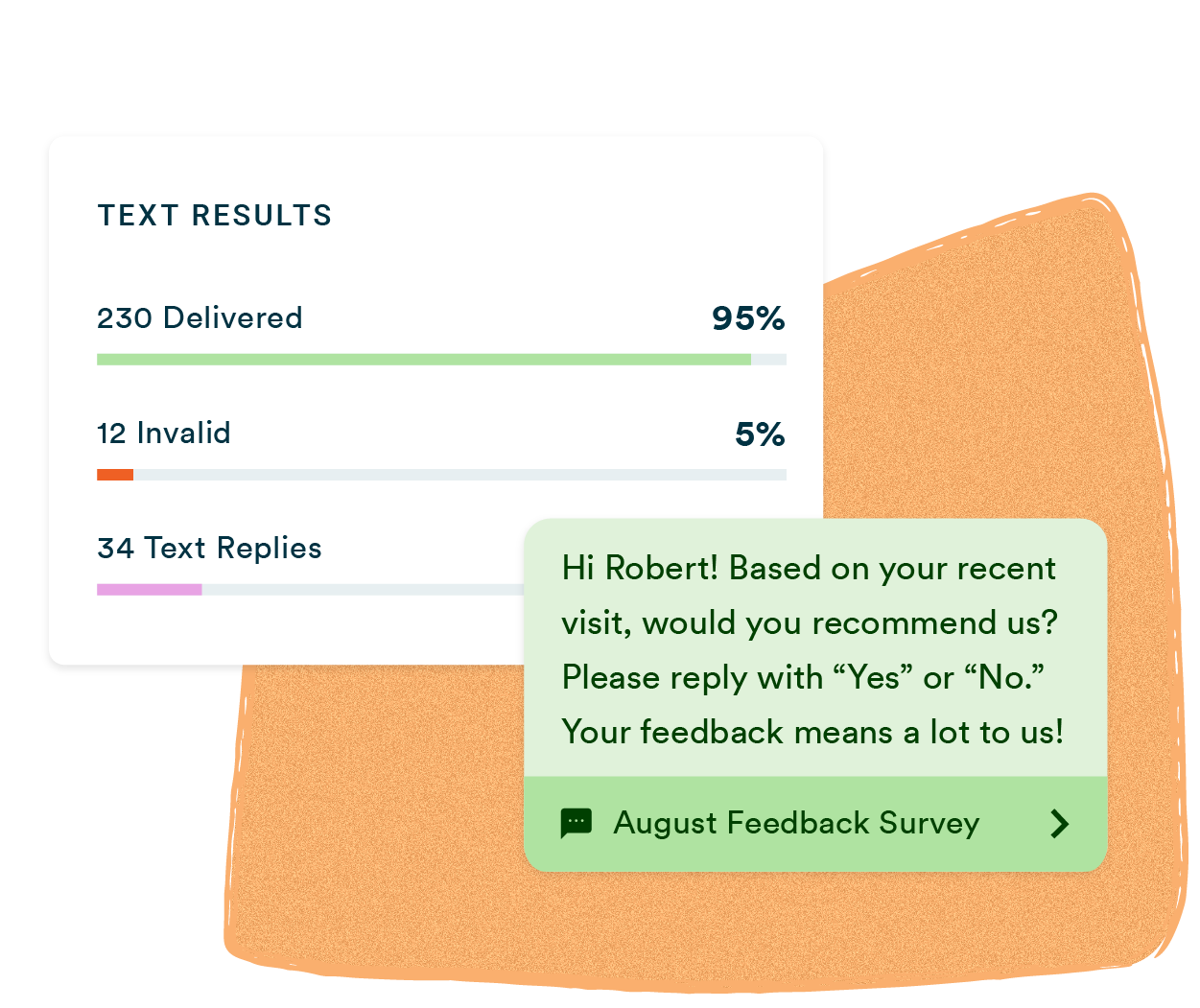
After every broadcast, you get a full picture of delivery rates, response rates, and reply content. No manual tallying — the data is there when the survey closes.
Who uses Text-Em-All for text surveys?
Text surveys work for any organization that needs responses from a large group fast. These are the teams that rely on them most.
HR and operations teams
Confirm shift attendance, collect employee feedback, and fill last-minute openings without a round of phone calls. One broadcast reaches your entire workforce and replies come back in minutes.
Healthcare practices
Send appointment confirmation requests before every visit and follow up with patients after. Short, direct questions get answered the same day — and two-way texting handles anything that needs a closer look.
Nonprofits and churches
Coordinate volunteers, collect RSVPs for events, and gauge interest in upcoming programs without manual outreach. Text gets through to members who don't check email regularly.
Staffing agencies
Reach your entire candidate pool at once to confirm availability, schedule interviews, and fill open positions. Replies come back fast enough to make placements before the competition does.
Everything you need to run a text survey
Scheduled sending
Set your survey to go out at the right time, even when you're not at your desk. Mid-morning and early evening sends consistently outperform other windows.
Two-way texting
Contacts reply directly to your broadcast. Follow up with anyone who has a question or a response that needs more context.

Voice and text combo
Send a text survey, a voice broadcast, or both at once — useful when your contact list includes people who prefer a phone call over a text.
Contact management
Upload a list or add contacts manually. Text-Em-All automatically filters out non-textable numbers before your survey goes out.
Detailed analytics
See delivery rates, response rates, and reply content after every broadcast. Know who responded and who didn't.
Auto-replies
Automatic responses go out the moment a contact replies. Acknowledging a response increases the likelihood they'll participate next time.

Best practices for text surveys
A text survey works best when it's easy to answer and arrives at the right moment. These four practices consistently produce higher response rates across every industry and use case.
01
Keep it short
Stick to one question per message and stay under 160 characters where possible. Contacts who have to read twice are less likely to respond — brevity is the fastest path to a reply.
02
Time it right
Send mid-morning or early evening on weekdays. Avoid early mornings, late nights, and weekends. For post-transaction surveys, send within 24 hours while the experience is still fresh.
03
Give clear instructions
Tell contacts exactly how to respond — "Reply YES or NO" or "Reply 1-5." Ambiguous instructions produce ambiguous data. The easier you make it to answer, the more answers you get.
04
Follow up
A quick auto-reply after someone responds shows their input was received. Contacts who feel acknowledged are significantly more likely to participate in your next survey.
How do you send a text survey with Text-Em-All?
Sending a text survey with Text-Em-All takes four steps: upload your contacts, write and send your broadcast, engage with replies through two-way texting, and review results in your analytics dashboard. Most organizations send their first survey within minutes of creating an account.
01
Add contacts
Add your contacts manually or upload a list. Text-Em-All automatically identifies non-textable numbers so your survey only goes to contacts who can receive it.
02
Send your message
Choose text, voice, or a combination. Write your survey message, add your contacts, and send immediately or schedule for later.
03
Engage with replies
When contacts respond, you can reply directly through two-way texting. Answer questions, provide more details, and keep the conversation going without switching tools.
04
Track performance
See delivery rates, response rates, and reply content after every send. Your results are ready as soon as responses come in — no manual tallying required.
Hands-down, the best feature is the speed at which the calls and texts are made. We also love the survey feature, which is very helpful for determining how many people to prepare for a given meeting or event.
- Lance Douglas G.., Small Business Employee
Questions about sending text surveys
-
How do text surveys increase response rates compared to other methods?
Text surveys consistently outperform email because texts are read within minutes of delivery. Studies show SMS surveys receive response rates 5-10 times higher than email surveys. When speed matters — confirming a shift, collecting post-visit feedback, filling an open slot — text is the channel that gets you answers the same day.
-
What types of questions work best for text message surveys?
Yes/no questions, multiple choice options, and simple rating scales work best for SMS. Keep questions under 160 characters and limit surveys to 3-5 questions for the highest completion rates. Text-Em-All formats your survey for mobile viewing and makes it easy to collect both quantitative and open-ended responses.
-
When is the best time to send a text survey?
Mid-morning (10-11 am) and early evening (6-8 pm) on weekdays consistently outperform other send windows. All broadcasts must be sent between 8 am and 9 pm in the recipient's local time zone per TCPA requirements. For post-transaction surveys, send within 24 hours while the experience is still fresh.
-
How does Text-Em-All handle survey responses?
Every reply comes into your two-way texting inbox, where you can respond directly to individual contacts. Delivery rates, response rates, and reply content are all visible in your analytics dashboard after every broadcast. Auto-replies can be configured to acknowledge responses automatically.
-
What are the best practices for creating effective text surveys?
Keep your message short, give contacts clear instructions on how to respond, and send at the right time. Follow up with respondents after they reply — contacts who feel acknowledged are more likely to participate next time. Text-Em-All's auto-reply feature makes following up automatic.
Send your first text survey today
Sign up for a free Text-Em-All account and send a test message to yourself in minutes. No credit card required, no complicated setup — just upload your contacts, write your question, and see how fast responses come back.